Twitter
Retweet Bot for Twitter - How to make your…
Wouldn’t it be cool, if you were able to make your own Twitter retweet bot which will automatically retweet tweets of a specific #Hashtag for you? Exactly this you will be able to do, after you read this article (; . To build up the Twitter retweet bot we will use an programming language called “Ruby”. “Ruby” is very easy to handle, but don’t worry you need to learn Ruby to follow this tutorial.
Set up Twitter
First you need to create an Twitter “application” right there: https://apps.twitter.com
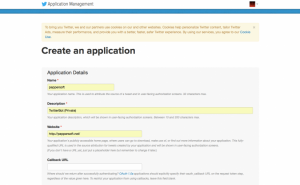
Just fill out the informations and create your applications.
Now navigate to “Keys and Access Tokens” and create an asses token (“Create my access token”). This information we need later to create a “connection” between your Ruby application and your Twitter account.
Create your Ruby application
To run a Ruby application on your computer you will have to install Ruby. If you have mac OSX, Ruby is already preinstalled. On a Windows based OS you can get and install Ruby with this easy to use installer: http://rubyinstaller.org .
Now open the command line, short cmd if you have an windows based system. If you have an OSX based system open the Terminal. Type in following command to install a ruby Twitter library ( you need Admin privileges):
gem install twitterAfter you installed Ruby you need to create a blank file named twitterbot.ruby (you can save the file on the desktop). Now open this file with a text editor (you can use for example atom.io ).
Paste in following Ruby code:
require 'twitter'
client = Twitter::REST::Client.new do |config|
  config.consumer_key = "x"
  config.consumer_secret = "x"
  config.access_token = "x"
  config.access_token_secret = "x"
end
Open your Twitter application again (https://apps.twitter.com). Navigate to “Keys and Access Tokens”
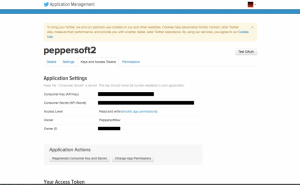
Now replace the x’s in the Ruby code with your Twitter application keys that are on the page.
consumer_key: Consumer Key (API Key) | looks like this: xaFsgjRm73FkeueWLZtDewxsmb
access_token: Access Token | Looks like this: 2357167676-uzL8718IfrwzVVzvOGHJG8MlK4O3Oh4X8mCGHUG
access_token_secret: Access Token Secret | Looks like this: yMETR1e1uZb6IXSH78p38766TA0hNMH0SQbMujFw3is
consumer_secret: Consumer Secret (API Secret) | looks like this: 3A9c8hUZGhbb2Lzf9u9robYQ8h9MW8UA7OJ899N8Q5XD98MZ
For example consumer_key would look like this:
config.consumer_key = "xaFsgjRm73FkeueWLZtDewxsmb"Please note that you can not use the keys in the examples here! When you are done with this paste this code under the last code you’ve pasted in:
def run(client)
  retweetKeyword = "#News"
  while true
    re = client.search(retweetKeyword).first.id
    client.retweet(re);
    puts "Retweet: #{re} #{Time.now}";
    sleep(300); #Every five minutes
  end
end
run(client);
Replace the value #News of retweetKeyword with an other hashtag value (if you want). The retweet interval is set to 5 minutes, you can change this by editing sleep() in line 7 (you have to enter seconds 300sec == 5min). Save the file and open your terminal/command line again type in:
ruby [location to your twitterbot.ruby or drag and drop twitterbot.ruby in the window]
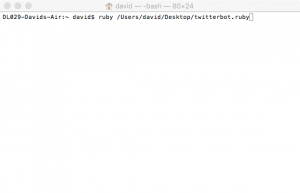
Press enter. If everything works fine you will see something like this:
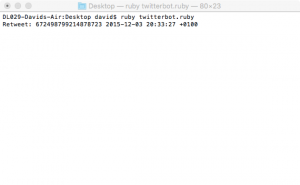
Just keep the bot running to automatically retweet. Please note that the Twitter API is limiting retweet’s to 2,400 per day. I hope you’ve enjoyed reading, if you have any questions feel free to comment below. You can download twitterbot.ruby from here, if you don’t want to do it your own (you still have to fill out your own API keys ) : https://goo.gl/CU6EW9